
Create Group · visual field guide
An illustrated tour of Create Group with focused images of its controls and settings.
Orient yourself on the page
Design-preview images. These captures use sample data from the redesigned workspace. Illustrations use sample data. Available controls and results depend on your connected platform and account permissions.
Use this overview to locate the main controls before following the focused illustrations below.
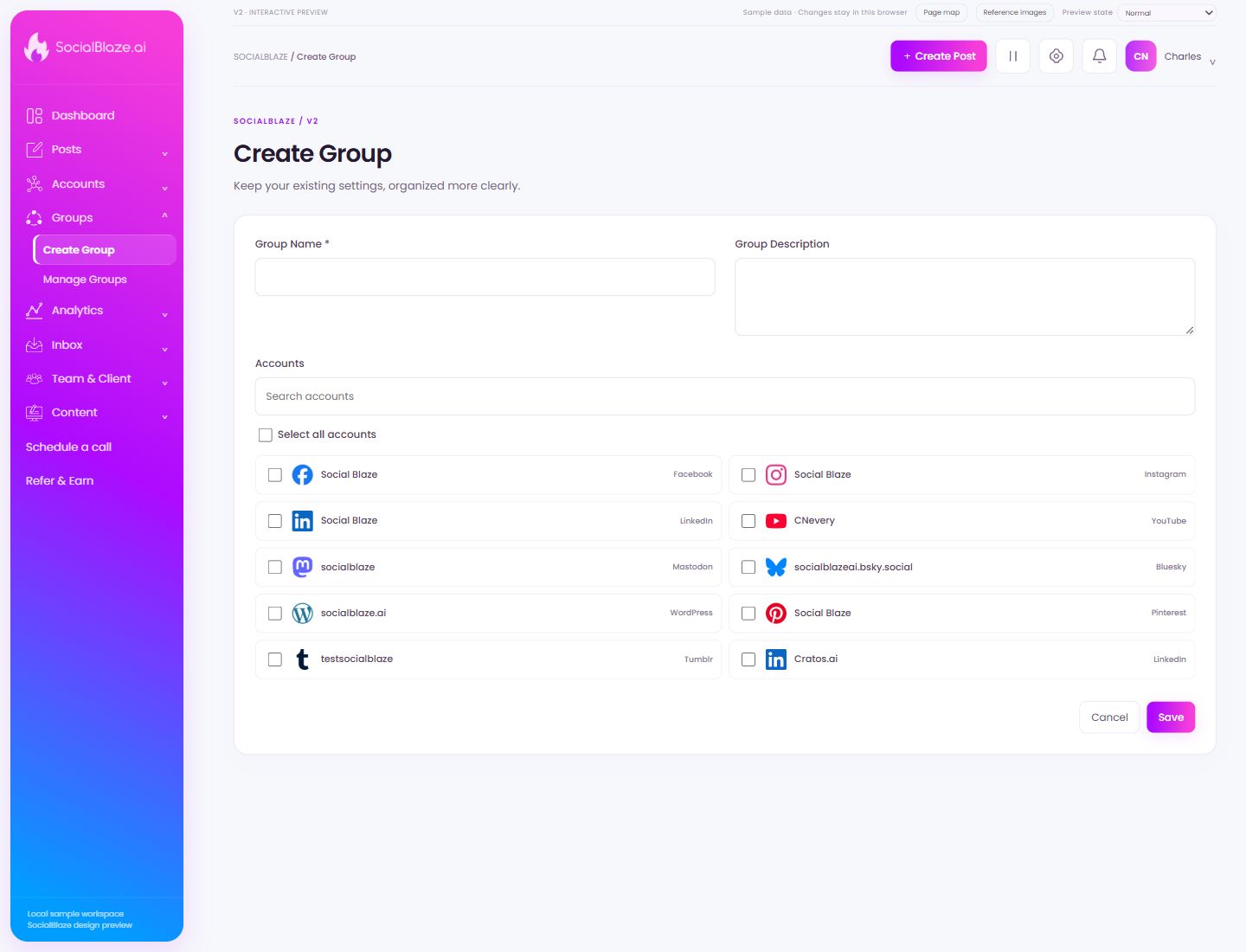
Name the account group
Choose a recognizable name such as a client, brand, or campaign. The name helps you find the group in the composer; the selected accounts determine which profiles it contains.
Explain the group’s purpose
Add a short description that helps teammates distinguish this group from similar ones. Avoid putting credentials or other private connection details in the description.
Find one connected profile
Enter part of the account name. Read the platform label as well as the display name: the same name can belong to several social networks. Clear the search to return to the full list.
Select a specific item
Select this checkbox to include only this item in a batch action. Review the selected count and each selected row before using bulk controls. Clear the checkbox to exclude it again.
Select Social BlazeFacebook
Check this option only when it belongs in the intended account selection or permission configuration. Review the selected set before saving. Selecting a profile for a group or feed is separate from granting a person access to it.
Select Social BlazeInstagram
Check this option only when it belongs in the intended account selection or permission configuration. Review the selected set before saving. Selecting a profile for a group or feed is separate from granting a person access to it.
Select Social BlazeLinkedIn
Check this option only when it belongs in the intended account selection or permission configuration. Review the selected set before saving. Selecting a profile for a group or feed is separate from granting a person access to it.
Select CNeveryYouTube
Check this option only when it belongs in the intended account selection or permission configuration. Review the selected set before saving. Selecting a profile for a group or feed is separate from granting a person access to it.
Select socialblazeMastodon
Check this option only when it belongs in the intended account selection or permission configuration. Review the selected set before saving. Selecting a profile for a group or feed is separate from granting a person access to it.
Select socialblazeai.bsky.socialBluesky
Check this option only when it belongs in the intended account selection or permission configuration. Review the selected set before saving. Selecting a profile for a group or feed is separate from granting a person access to it.
Select socialblaze.aiWordPress
Check this option only when it belongs in the intended account selection or permission configuration. Review the selected set before saving. Selecting a profile for a group or feed is separate from granting a person access to it.
Select Social BlazePinterest
Check this option only when it belongs in the intended account selection or permission configuration. Review the selected set before saving. Selecting a profile for a group or feed is separate from granting a person access to it.
Select testsocialblazeTumblr
Check this option only when it belongs in the intended account selection or permission configuration. Review the selected set before saving. Selecting a profile for a group or feed is separate from granting a person access to it.
Select Cratos.aiLinkedIn
Check this option only when it belongs in the intended account selection or permission configuration. Review the selected set before saving. Selecting a profile for a group or feed is separate from granting a person access to it.
Select Cratos.aiFacebook
Check this option only when it belongs in the intended account selection or permission configuration. Review the selected set before saving. Selecting a profile for a group or feed is separate from granting a person access to it.
Select Charles NeveryTikTok
Check this option only when it belongs in the intended account selection or permission configuration. Review the selected set before saving. Selecting a profile for a group or feed is separate from granting a person access to it.
Select Charles Thomas NeveryThreads
Check this option only when it belongs in the intended account selection or permission configuration. Review the selected set before saving. Selecting a profile for a group or feed is separate from granting a person access to it.
Select CharlesLinkedIn
Check this option only when it belongs in the intended account selection or permission configuration. Review the selected set before saving. Selecting a profile for a group or feed is separate from granting a person access to it.
Leave without applying the dialog changes
Use Cancel when you do not want to apply the proposed change. If the screen has unsaved content, read any discard confirmation before continuing.
Save the reviewed settings
Check the values and account selections before saving. After the dialog closes, reopen or inspect the resulting row to confirm the intended change.